Spreadsheet Templates

Profit & Fee Dashboard for Etsy Sellers (International Edition)

See your real profit on every Etsy order, with the right fees and VAT for your country. Excel and Google Sheets, no macros.

$16.99 Free during launch
Download free (.zip, 2.8 MB)

Instant download, no sign-up. Free during launch.

License: For use in your own business (commercial use allowed); see License.pdf in the download. No resale or redistribution.

Not affiliated with, endorsed by or sponsored by Etsy, Inc. Etsy is a trademark of Etsy, Inc. Results are estimates and a bookkeeping aid, not tax or financial advice.

Description

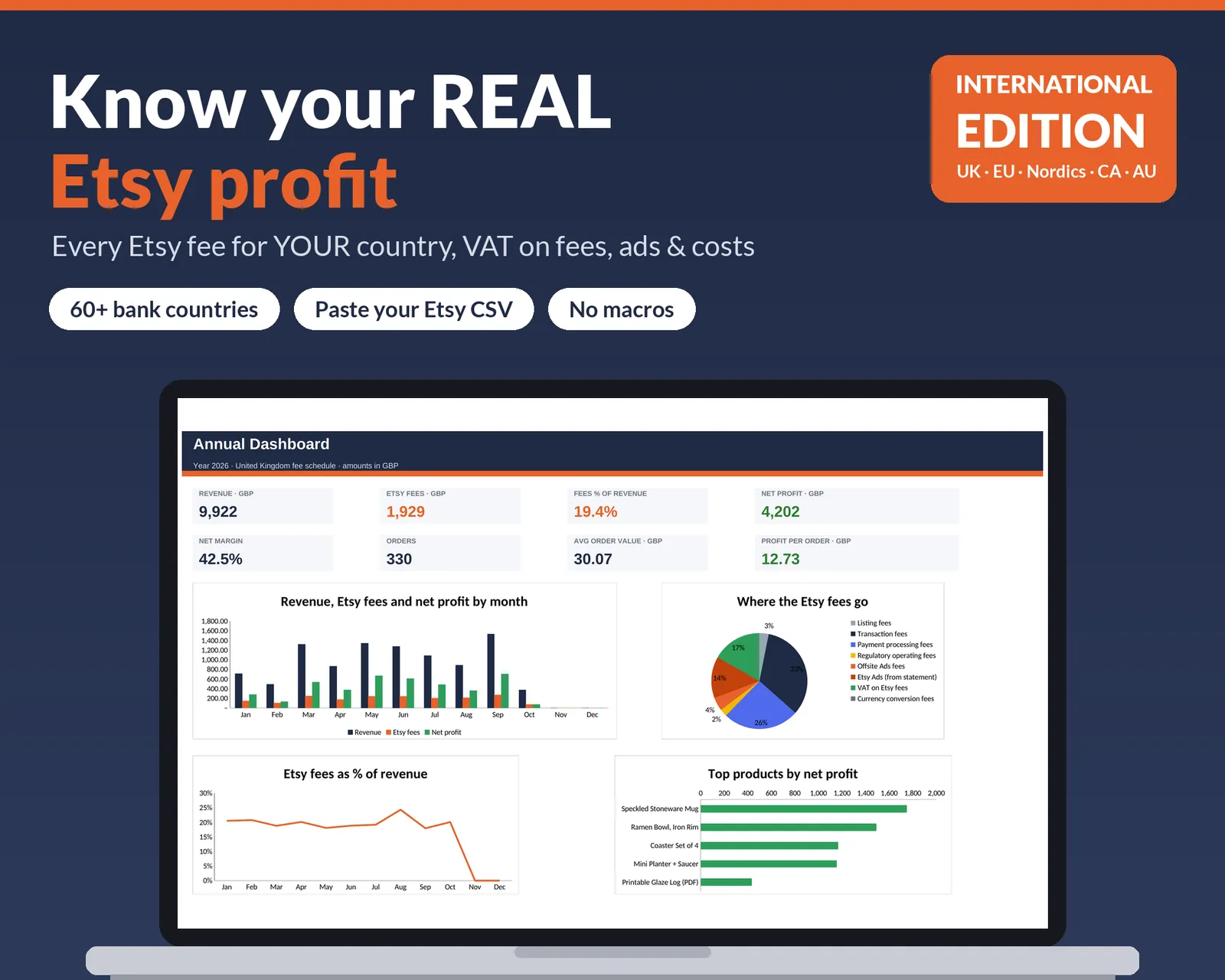
Know your real Etsy profit, using the fees for your country.

Most Etsy profit spreadsheets assume US fees (3% + $0.25). If your bank account is in the UK, EU, Norway, Canada, Australia or one of 60+ other countries, Etsy charges a different processing fee, often a regulatory operating fee, and then adds VAT on top of its own fees. This dashboard handles all of that.

Paste in your Etsy CSV export and every order shows its listing fee, transaction fee, payment processing, regulatory operating fee, Offsite Ads, VAT on fees, product cost and net profit.

What it does

  • Fee schedules for 60+ bank countries, taken from Etsy's Help Centre (dated, with source links)
  • VAT on Etsy fees at your country's rate, switched off automatically when you add a VAT ID (where Etsy allows it)
  • Regulatory operating fee for the UK, France, Italy, Spain, Canada and others
  • Domestic vs international processing rates (Australia, Canada, New Zealand)
  • Multi-currency: list in USD, get paid in NOK, GBP, EUR and so on
  • Copy-paste import of the Etsy Orders CSV and payment statement CSV. No macros, no scripts, no permission pop-ups
  • Net profit and margin for every order
  • Monthly P&L, annual dashboard with charts, top products
  • Pricing calculator: enter your target margin and get the price that hits it after every fee
  • Tax summary with yearly and quarterly totals for your accountant
  • Statement check that compares Etsy's actual fees with the estimates

How it works

  1. Choose your bank country, shop currency and VAT-ID status.
  2. Download your Orders CSV from Etsy and paste it in.
  3. Read your profit per order, per month and per year.

Works with

  • Microsoft Excel 2010 or newer (Windows and Mac)
  • Google Sheets (free: upload the file and choose "Save as Google Sheets")
  • LibreOffice Calc

A computer (not a phone) is needed for setup.

Good to know

  • Fee rates are taken from Etsy's Help Centre (October 2026). Etsy can change its fees; you can edit the fee table yourself.
  • Etsy publishes which countries pay VAT on seller fees but not the percentages, so the dashboard uses national standard VAT rates, which you can override.
  • Etsy's CSV column names can vary; they are editable on the Import tabs.
  • Results are estimates and a bookkeeping aid, not tax or financial advice.
  • For use in your own business. Reselling or sharing the files is not allowed (see License).
  • Not affiliated with or endorsed by Etsy, Inc.